How Can Remote Workers Make Their Desk Feel More Personal And Comfortable?

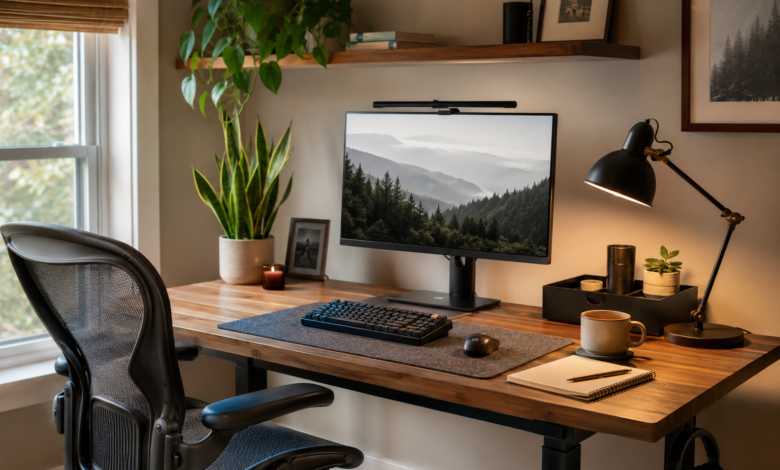
8+ hours a day staring at the same piece of wall is not fun. Even in the first few months of remote work, the initial excitement and novelty of working from home starts to wear off very quickly as the space you are working in starts to become a sterile, a cramped, and uncomfortable work space that is so far removed from the life of work in an office that for many remote workers their work life is actually less productive than it would be in an office.
Even though you have a home office or workspace to work from, your home workspace can still be very unproductive. Sometimes all it takes is some very small changes to your home workspace to make it more productive and reflect who you are as a person. You don’t have to spend a lot of money to get some of the best changes to a workspace. You don’t have to redecorate a room to make changes to a space productive and efficient.
Start with ergonomic fundamentals
Your chair is likely to be one of the most expensive items in your home office. That is because the biggest items are the ones that have the biggest impact on your quality of life at the end of the day. Therefore, a good quality, ergonomic chair that offers the right amount of support for your lower back, and which is at the correct height for your feet, is crucial for hours of sitting at a computer. Armrests should support your arms so that your elbows are at 90 degrees when your hands are on the keyboard and mouse.
In our home office setups, the chairs we sit in for long hours of work are usually not the best for our back health. While it is ideal to invest in the best quality ergonomic chair for your back as soon as possible, it may not be within your budget right away. In the meantime, you can purchase a good quality lumbar cushion that can be placed on your existing chair to support the natural curve of your lower back. Make sure to place the cushion at the bottom of your spine, and not between your shoulder blades. After a week or so, you will soon realize the difference that this cushion makes in supporting your back health.
Pay close attention to the height of your monitor or screen as well. The top of the monitor or screen should be at eye level or below in order to avoid leaning forward in what is referred to as forward head posture and risk developing neck pain and or headaches.
Control your lighting environment
Many home workers forget about the home working environment lighting and how it can affect productivity. This is largely due to the home environment not allowing changes to change the harsh overhead fluorescent light to a softer alternative. By placing a table lamp behind your computer monitor you can create a lot of glare on the screen which again can cause more fatigue in the long run as your eyes will have to work a lot harder.
A desk light is the main light source in a home office and should be positioned so that it is at a right angle to your computer screen. A desk light positioned on the left hand side of your desk or right hand side of your desk can provide even, non-glare illumination to your workspace. Adjustable brightness is also an important feature of a home office light as the level of brightness you require will depend upon the task you are completing and the time of day. For example, you will require a higher level of brightness when completing tasks on a computer program for manipulating spreadsheets as opposed to a video conferencing call with customers or colleagues.
The other thing to consider with regards to using natural light to illuminate a home office space is to position of your desk in relation to the window. As opposed to placing your desk with the window directly behind your monitor, place your desk so that the window is on the side. Then you can use your blinds or curtains to control the amount of light that enters your home office space during peak sun hours to avoid glare on your monitor. However, don’t block out all of the natural light from entering your home, as natural light is important for your body’s circadian rhythms.
Add desk upgrades that eliminate daily friction
There are a number of desk accessories, such as high-quality desk pads and even personalized mousepads, that you can incorporate into your space to make your workspace more enjoyable to work in and even add some personality to your home office. Desk accessories such as a small tray to hold charging cables and adapters for your equipment can also help to create a clean home office space and eliminate some of the stress and frustration that can come from having to rummage through cords and cables to find the one that you need to charge your devices.
I used adhesive cable clips along the edges of my work surface to secure the power cable and USB cables. And a cable tray to store all of the charging cables and adapters for my various devices. The tangle of cables so often found in home workspaces is banished!
Set up your work space to hold the things you need to work. This means that your work space will be effective as a work space only if your work space is set up to hold the items that you use in your work on a regular basis. A desk organizer with a number of different trays is good only if your work space is set up to hold the items that you use in your work on a regular basis. A paper tray, for example, is generally a waste of space if you don’t use a lot of paper in your work. Likewise, pens and other writing tools that you use frequently can be stored in a small container that is located near your work space so that you can grab them quickly as needed.
Organize strategically, not obsessively
For many people, it’s hard to accept the frequency principle of organizing a workspace. They believe that all the things they use in their work should be on their desk, and the things they use less frequently (like office supplies) should be put in a drawer, on a shelf, or in a storage container somewhere in their house. They need to be retrieved from time to time, and it’s best to keep them where they are used least.
Assigning zones for items on your desk will help to create an organized workspace. Try to set up a routine for writing down notes by placing your notebook and favorite pen in the same location every time. Consider storing your phone, keys, and other personal accessories in a tray or container on your desk to prevent them from being scattered all over the place and creating visual distractions when you are on calls.
Utilize your wall space to store items at vertical. Rather than searching for a larger desk that is larger to hold all your supplies, a set of wall-mounted shelves would be perfect for holding books, folders, and other supplies. Be cautious of over-organizing a storage system. In the end, it could end up creating more work than it is worth.
Add living elements
Adding plants to your home office is also a good idea. They not only improve the air quality, and make the room look more pleasant. The psychological influence of plants can be even greater, than their positive influence on air quality. However, you have to choose the right species of plants that are not too demanding, and can thrive in average home conditions. Pothos, Snake Plants and ZZ Plants are perfect for that, because they can be watered only once or twice a week.
When bringing plants to your home office, you should make sure that they are placed in a location that is not going to conflict with your normal functioning in the space. For example, placing a small plant on a high shelf in the corner of a room is a great way to display a small amount of greenery without it becoming a distraction.
Make it yours
Decorate your workspace with things that show your interests, hobbies, passions and other characteristics that define you as a person. These could be photos, artwork, collectibles, memorabilia, mementos, decorations for your home or office, sculptures, figurines, home office accessories and gadgets, gizmos, knick-knacks, keepsakes, etc. Items that reflect your interests and your way of working can create an inspiring workspace.
Keep in mind that your workspace should first support your productivity and then allow you to express your personality. There are a lot of things you can add to your workspace in order to give it some personality. Typically, 3 to 5 items will be enough to personalize your workspace without distracting you from your work too much.