TapiLink Connects Digital Business Cards With Apple and Google Wallet

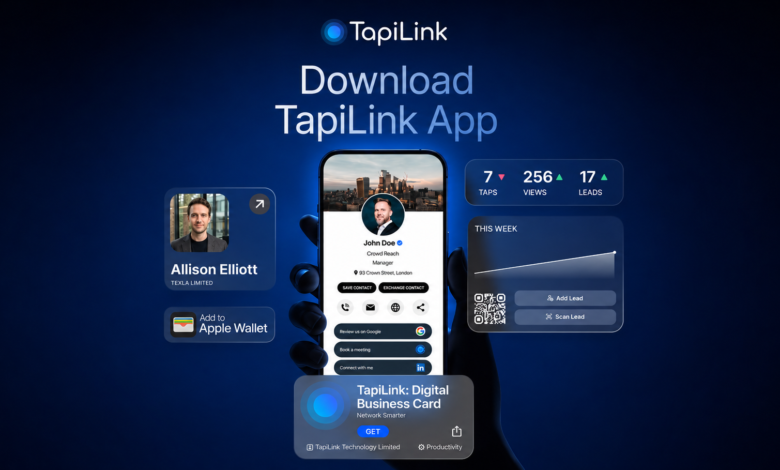
Professionals increasingly rely on their phones for payments, tickets, travel documents and event passes. Storing a business card in the same familiar location is a logical next step.
A digital business card stored in Apple Wallet or Google Wallet gives its owner quick access to a professional profile without searching through an app, photo gallery or email thread. The card can be opened when a new contact asks for details, then presented through its QR code or connected profile link.
This approach does not replace professional conversation. It removes a small but common point of friction: finding and sharing the right information at the moment a new connection is made.
Why Traditional Contact Sharing Can Interrupt a Conversation
Consider a hypothetical independent consultant named Daniel.
Daniel attends client meetings, industry events and local business gatherings. He uses a paper card, but he does not always carry enough copies. He also has a digital profile, although opening it requires him to unlock his phone, find the correct app and navigate to the sharing screen.
Neither process is difficult, but both introduce unnecessary steps.
A digital card saved to a phone wallet gives Daniel a more direct route. He can open the same wallet he already uses for everyday passes and present his professional card when needed.
Apple describes Wallet as a place for eligible passes, tickets, coupons, rewards cards and similar items. Google likewise positions Google Wallet as a digital wallet for payment cards, passes, tickets, keys and supported IDs. Availability and individual features can differ by device, account and region.
The relevant benefit for Daniel is not simply that the card is digital. It is that his professional identity becomes accessible from a familiar part of his phone.
What Is a Digital Wallet Business Card?
A digital wallet business card is a phone-wallet pass connected to a professional profile. It can display identifying information such as a person’s name, job title, company and branding, together with a QR code or link that opens the complete digital card.
The full profile may contain:
- Contact information
- Company and job details
- Website and social-media links
- Portfolio or service pages
- Meeting-booking options
- Downloadable contact details
- Review or enquiry links
The wallet pass should not attempt to display everything. Its main purpose is to provide quick access to the live profile where the complete information is organised.
This distinction matters. A static image stored in a photo gallery may look like a business card, but it does not necessarily provide a maintained, interactive destination. A connected wallet card can direct people to a profile that the owner manages over time.
Why Apple Wallet and Google Wallet Suit Professional Cards
Digital wallets are designed to keep frequently accessed items together.
Apple’s Wallet framework supports several pass categories, including generic passes, and Apple notes that pass content can be updated. Google Wallet similarly supports different types of cards and passes, although the supported functions may vary by market and device.
For professional networking, this structure offers several practical advantages.
Faster Access During In-Person Meetings
A wallet card reduces the number of steps between a request for contact details and the actual exchange.
Instead of searching for an email, opening a browser bookmark or navigating through several app screens, the professional can open the card from the phone wallet and present the connected sharing option.
That speed is useful at exhibitions, conferences and busy networking sessions, where conversations often happen one after another.
One Recognisable Location
People already associate phone wallets with items they may need quickly.
Placing a business card there creates a consistent retrieval habit. This can be particularly useful for professionals who use multiple networking channels but want one dependable place from which to start sharing.
Less Dependence on Paper
A wallet card remains available when printed cards have been forgotten, damaged or used up.
Paper cards can still play a role in formal meetings or brand presentation. The digital-wallet version provides a practical backup and can direct the recipient to a richer profile than a printed card can hold.
Compatibility Across Major Mobile Platforms
Supporting both Apple Wallet and Google Wallet is important because professional networks rarely use only one mobile ecosystem.
An Apple-only workflow may exclude Android users, while a Google-only approach may be less convenient for iPhone users. A platform that supports both allows card owners to use the wallet suited to their own device.
The Profile Behind the Wallet Card Matters Most
Convenient access is valuable, but the destination must also be accurate and useful.
A professional profile should clearly identify the person, explain their role and provide an appropriate next step. That action may be saving a contact, visiting a company website, viewing a portfolio or booking a meeting.
For Daniel, the consultant in our example, the profile might include:
- His name and consultancy
- Direct phone and email buttons
- A LinkedIn profile
- A short service overview
- Two relevant case studies
- A meeting-booking link
The wallet pass gives him rapid access, but the live profile provides the substance.
This is also why digital card owners should review their information regularly. A card that opens quickly but leads to an outdated job title, broken link or old phone number creates more friction rather than less.
How TapiLink Applies the Wallet Model
One platform connecting digital business cards with both major wallet ecosystems is TapiLink.
The company’s current platform information states that users can add their cards to Apple Wallet and Google Wallet, open their profiles from the wallet and continue directing recipients to an updated profile when information changes. TapiLink also supports profile links, QR codes, email signatures, smartwatches and NFC products as separate sharing methods.
The technical model centres on one digital profile.
The wallet card acts as an access layer, while the connected profile holds the user’s current professional information. This means the professional does not need to build a separate identity for each sharing channel.
A QR code, email-signature link, wallet pass and NFC card can all direct people towards the same maintained destination.
Professionals can review the wider platform through the TapiLink digital business card app, while the company’s digital wallet business card features cover Apple Wallet and Google Wallet access alongside its other sharing tools.
A Practical Wallet-Based Sharing Workflow
A reliable wallet workflow can be understood in five stages.
1. Build the Professional Profile
The user adds verified contact information, a current photograph or logo, company details and relevant links.
Only useful information should be included. A crowded profile can make it harder for a new contact to understand the next step.
2. Add the Card to the Appropriate Wallet
The user saves the supported pass to Apple Wallet or Google Wallet, depending on the phone and operating system.
Device compatibility, wallet availability and account settings should be confirmed during setup. Google notes that some Wallet functions are not available in every country or region.
3. Open the Card When Needed
During a meeting or event, the user opens the pass from the phone wallet.
The card can then present its QR code or connected route to the live profile. The precise interaction depends on the pass design, the device and the platform implementation.
4. Let the Recipient Open the Profile
The recipient scans or follows the available link to access the professional profile.
TapiLink states that people receiving a shared profile do not need the TapiLink app simply to view it.
5. Maintain the Profile Over Time
When the owner changes their job title, phone number, website or featured link, the profile should be updated.
TapiLink describes its wallet sharing as connected to an editable profile, allowing the same sharing routes to continue pointing towards the user’s latest saved information.
Wallet Cards, QR Codes and NFC Cards Are Not the Same
These technologies are sometimes described as though they perform one identical function, but they play different roles.
A wallet card stores a convenient pass on the user’s phone. A QR code provides a visual route that another phone can scan. An NFC business card is a separate physical product containing a programmed near-field communication chip.
The wallet itself should not automatically be described as an NFC business card. Unless a specific implementation explicitly supports contactless sharing from the phone, the safer description is that the wallet pass provides quick access to a QR code or live-profile link.
TapiLink lists Wallet, QR and NFC as distinct sharing options within the same platform. This gives users multiple routes to one profile without treating the technologies as interchangeable.
Where Wallet Business Cards Are Most Useful
Conferences and Exhibitions
Professionals can keep their card ready without carrying a large supply of printed materials. A wallet card is particularly useful as a backup when physical cards run out.
Sales Meetings
A salesperson can present a profile containing direct contact buttons, product information and a booking option instead of handing over only a name and phone number.
Freelance and Consulting Work
Consultants, designers and independent professionals can use the connected profile to share portfolios, service pages and scheduling links.
Recruitment and Careers Events
Recruiters can direct candidates to company information or active opportunities. Candidates can use a digital profile to present their experience and professional links.
Hybrid and Remote Networking
Although phone wallets are especially convenient in person, the same underlying profile can also be shared through email, messaging services or an online meeting.
What Businesses Should Evaluate Before Adoption
A business should test the complete experience rather than selecting a platform based only on the presence of a Wallet logo.
Important questions include:
- Does setup work reliably on the organisation’s supported devices?
- Is the card easy to open during a live conversation?
- Does the QR code scan clearly at normal screen brightness?
- Can profile information be updated without rebuilding every sharing asset?
- Do recipients need an account or app?
- Can administrators maintain consistent branding for employees?
- Does the provider publish appropriate privacy and support information?
Teams should also test the profile on different screen sizes and verify every contact button and external link.
Wallet availability must not be assumed for every user. A direct profile link and QR code provide useful alternatives when a particular device, country or account does not support the expected wallet function.
Digital Wallets Make the Card Easier to Reach
The main advantage of putting a business card in Apple Wallet or Google Wallet is accessibility.
It gives a professional a familiar place to keep the card, a faster way to retrieve it and a direct route to a richer digital profile. The recipient can then access current contact information and relevant professional links without relying on a paper card.
TapiLink brings this model into a broader networking system by connecting Wallet access with digital profiles, QR sharing, profile links and optional NFC products.
The technology works best when it remains in the background. A useful wallet card does not attempt to replace the introduction, conversation or professional judgement behind a new relationship. It simply makes the next step—sharing accurate information—quicker and easier.