content cz mobilesoft appblock fileprovider cache blank html: What It Means and How to Fix It

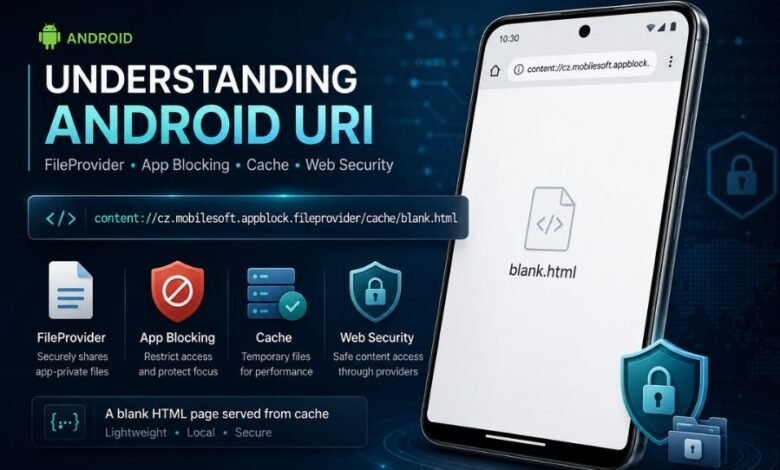
The phrase content cz mobilesoft appblock fileprovider cache blank html can look alarming when it suddenly appears in an Android browser, browsing history, or another part of a phone. In its normal context, however, it is connected with AppBlock, a screen-time and website-blocking application developed by MobileSoft. The actual Android address is commonly displayed as content://cz.mobilesoft.appblock.fileprovider/cache/blank.html.
Rather than being a normal internet address, it is a content URI used by Android to identify data supplied by an application. Android’s official documentation explains that FileProvider can generate content URIs for files an app needs to make available in a controlled way. Understanding that distinction makes the unusual-looking address much easier to explain.
What Is content cz mobilesoft appblock fileprovider cache blank html?
The string is associated with the Android version of AppBlock, an app designed to restrict selected applications, websites and online distractions. Google Play identifies the official AppBlock Android package as cz.mobilesoft.appblock, while MobileSoft is listed as its developer.
The complete form normally looks like this:
content://cz.mobilesoft.appblock.fileprovider/cache/blank.html
This is not a standard website beginning with http:// or https://. Instead, the content:// scheme belongs to Android’s content-provider system. Android applications can use this system to expose selected data through controlled URIs instead of revealing direct filesystem locations.
In this case, the address points towards a file named blank.html associated with AppBlock’s FileProvider and cache-related storage. The address may become visible when a browser encounters AppBlock’s website-blocking behaviour.
Breaking Down the Strange Android Address
The easiest way to understand the address is to separate it into parts.
content://
The content:// prefix tells Android that the location should be handled through a content provider, rather than treated as an ordinary internet page.
Android uses content URIs as structured identifiers. A URI normally contains an authority identifying the provider and a path identifying the particular data or file involved.
cz.mobilesoft.appblock.fileprovider
This part identifies the FileProvider authority associated with AppBlock.
The important section is cz.mobilesoft.appblock, which matches the Android application ID shown for AppBlock on Google Play. The added .fileprovider portion indicates that the URI is being handled through an Android FileProvider configuration.
FileProvider is a standard Android mechanism. Android’s developer documentation describes it as a way to generate content URIs that allow controlled access to files instead of exposing direct file paths.
/cache/blank.html
The final portion refers to blank.html, associated with a cache path. The .html extension indicates an HTML document, while the name “blank” strongly reflects its role as an empty or minimal page rather than an ordinary website.
Android applications commonly use cache directories for temporary files. Android also provides mechanisms for FileProvider configurations to work with selected cache locations.
Why Does content cz mobilesoft appblock fileprovider cache blank html Appear?
The most likely explanation is that AppBlock’s website restriction system is active.
AppBlock officially supports website blocking on Android. Its documentation says Android website blocking relies on Accessibility permission, and users can configure websites through schedules or Quick Block.
When a restricted destination is intercepted, a browser may end up displaying a local AppBlock-related page instead of continuing to the requested website. Independent technical explanations of this exact URI describe blank.html as a local placeholder associated with AppBlock’s blocking process.
This helps explain why someone may see a completely blank page along with an unfamiliar address.
It May Appear After Opening a Blocked Website
If AppBlock has been configured to restrict a particular domain, URL or keyword, attempting to visit matching content may trigger the blocking mechanism.
AppBlock currently supports blocking specific websites, URLs and keywords, alongside apps and other distractions.
Therefore, seeing the URI does not necessarily mean the browser failed. It can indicate that the restriction was successfully triggered.
It Can Also Appear Unexpectedly
Sometimes the blocked page may appear when a person does not remember restricting the website involved. AppBlock advises users in this situation to review active schedules, Allowlist settings, categories and blocked keywords.
A broad keyword rule, an old schedule or another active blocking configuration can produce results that initially seem unrelated.
Is content://cz.mobilesoft.appblock.fileprovider/cache/blank.html a Virus?
By itself, the address is not evidence of a virus. It uses Android’s normal content:// URI format and contains the official AppBlock application identifier shown on Google Play.
If AppBlock is installed on the phone and the address appears while website blocking is active, the most reasonable explanation is AppBlock’s local blocking process.
However, an unfamiliar address should always be considered in context. If AppBlock was never intentionally installed, the device is behaving strangely, or unknown applications have appeared, checking the installed-app list and running Android’s normal security checks is sensible.
A content URI should also not automatically be considered safe merely because it begins with content://. Android warns developers that incorrectly configured FileProviders can create security risks. That warning concerns FileProvider implementation in general and does not establish that this particular AppBlock URI is malicious.
Why Does a Blank Page Appear Instead of a Warning?
A blank page can be part of how access to restricted content is interrupted.
Instead of allowing the requested site to remain available, AppBlock can stop the normal browsing flow. The visible blank.html address reflects a local resource rather than the blocked internet destination.
AppBlock also explains that website blocking on Android depends partly on browser behaviour and Accessibility-based detection. A page can occasionally appear briefly before the blocking screen takes over, and browser updates or unsupported browsers can affect how blocking works.
This means the exact visual result can differ between browsers and Android devices.
How to Stop the AppBlock Blank HTML Page Appearing
If AppBlock is deliberately installed, first determine whether the blank page is actually doing what your blocking settings requested.
Check Active AppBlock Schedules
Open AppBlock and review active schedules and Quick Block sessions. Look for the website, domain or keyword that was being accessed when the blank page appeared.
Also check whether a broad restriction is catching more websites than expected.
Review Website and Keyword Rules
AppBlock can restrict individual websites as well as specific URLs and keywords. A broad keyword may affect many pages sharing the same term.
If a legitimate website keeps being blocked, adjust the relevant rule rather than changing unrelated Android settings.
Check AppBlock Permissions
If blocking works inconsistently, AppBlock’s own Android instructions recommend checking required permissions, particularly Accessibility. Its troubleshooting guidance also mentions Usage Access for app-blocking functions.
Permissions that have been disabled by Android, battery optimisation or a system update can interfere with expected behaviour.
Update AppBlock and Your Browser
Browser changes can occasionally affect website detection. AppBlock specifically notes that browser updates may temporarily interfere with blocking until compatibility is restored.
Keeping both AppBlock and the browser current is therefore a reasonable troubleshooting step.
Clear AppBlock Cache Only When Troubleshooting
Android allows temporary application cache data to be cleared through app storage settings. Doing so may remove temporary files, but it should not be treated as the main solution to an intentionally blocked website.
If AppBlock remains active and the same blocking rule is still enabled, temporary resources can simply be created again as the application continues operating.
What If Websites Are Being Blocked by Mistake?
Unexpected blocking is usually better solved inside AppBlock than by changing Android’s filesystem settings.
Review every active schedule and check for overlapping restrictions. Look at blocked URLs, keywords, categories and Allowlist settings. AppBlock’s support guidance recommends refreshing blocking after configuration changes and examining active schedules when restrictions do not behave as expected.
Browser compatibility also matters. AppBlock publishes a list of supported Android browsers that includes major options such as Chrome, Firefox, Microsoft Edge and several others.
If the problem occurs only in one browser, compatibility or a recent browser change may be more relevant than the blank.html file itself.
Should You Delete blank.html Manually?
For most users, manual file deletion is unnecessary.
The URI belongs to an application’s managed storage mechanism, not to an ordinary public web directory. Android deliberately separates app-specific data and provides controlled mechanisms for accessing files.
If AppBlock is no longer wanted, disabling its blocking rules or uninstalling the application through normal Android controls is cleaner than trying to locate and manipulate internal files.
If AppBlock is still being used, deleting a temporary file would not address the underlying blocking configuration responsible for producing it.
Conclusion
The phrase content cz mobilesoft appblock fileprovider cache blank html looks far more mysterious than it normally is. Its properly formatted version, content://cz.mobilesoft.appblock.fileprovider/cache/blank.html, is an Android content URI associated with the AppBlock application and its FileProvider-based file handling.
For users who intentionally installed AppBlock, seeing the address around the time a website is restricted usually points to the app’s blocking activity rather than an ordinary internet page. The best response is to check AppBlock schedules, website rules, keywords, permissions and browser compatibility. If blocking is intentional, there may be nothing to fix. If legitimate sites are being blocked unexpectedly, changing the relevant AppBlock configuration is generally more useful than attempting to delete the temporary HTML file itself.
(FAQs)
What does content cz mobilesoft appblock fileprovider cache blank html mean?
It refers to an Android content:// URI associated with AppBlock’s FileProvider and a file named blank.html in a cache-related path. It can appear when AppBlock is restricting website access.
Is content://cz.mobilesoft.appblock.fileprovider/cache/blank.html a real website?
No. It is not a normal HTTP or HTTPS website address. It is an Android content URI used to identify data made available through a content provider.
Why am I seeing blank.html on my Android phone?
If AppBlock is installed, a website-blocking rule may have been triggered. Check active schedules, Quick Block settings, blocked URLs and keywords.
Is the AppBlock FileProvider address dangerous?
Its appearance alone does not demonstrate malicious activity. The authority contains the same cz.mobilesoft.appblock application ID used by the official AppBlock Android app. If AppBlock is not expected to be on the device, review installed apps and device security settings.
How do I remove content cz mobilesoft appblock fileprovider cache blank html?
If it appears because AppBlock is intentionally blocking a website, edit or disable the relevant blocking rule. If AppBlock is no longer needed, remove it through Android’s normal app settings rather than attempting to manually delete internal files.