Vlog Camera for Solo Creators: Framing, Tracking and Audio Without a Crew

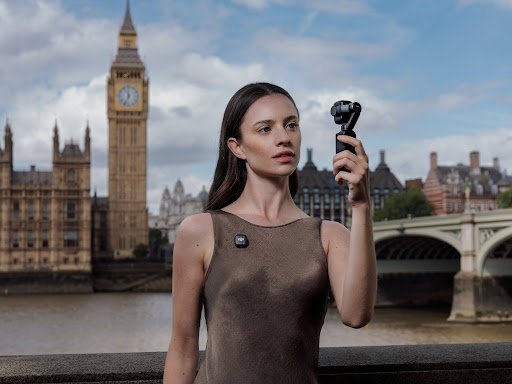
Filming alone changes what matters in a camera. When there is no operator behind the lens, image quality is only part of the problem. You also need to know whether you are properly framed, whether the camera can follow you when you move, and whether your voice is being recorded clearly.
That means choosing a vlog camera for solo work should start with workflow rather than resolution. Good subject tracking, an easy-to-see screen, reliable audio and a fast setup can save more ruined takes than another step up in megapixels.
Framing is the first challenge when nobody is behind the camera
For a simple seated video, framing is easy. Put the camera on a tripod, check the screen and stay in one position.
The difficulty begins when you move.
A cooking video might take you from a worktop to an oven. A fitness creator may cross the frame repeatedly. A travel vlogger might want to place the camera down, walk towards it and then continue moving past it.
A front-facing or rotating screen is useful because it lets you confirm the composition before recording. But once you step away from the camera, subject tracking becomes much more valuable.
For solo creators, the best tracking system is not necessarily the one that keeps a face perfectly centred. It is the one that maintains a natural composition while allowing the subject to move.
Tracking should suit the way you create
Different types of solo content require different levels of tracking.
For a talking-head video, face detection and reliable autofocus may be enough. For fitness, demonstrations or walking presentations, the camera may also need to physically follow the subject across the room.
A motorised camera or gimbal can do this by rotating as the subject moves. That gives a solo creator considerably more freedom than a fixed camera with autofocus alone.
It is also worth checking what kinds of subjects can be tracked. Some systems focus mainly on people, while others can follow pets, vehicles or selected objects.
Object tracking can be useful for product demonstrations, but it should not be treated as essential for every creator. If 90% of your work is simply you speaking to camera, reliable human tracking matters far more.
A wider lens makes solo setup easier
Lens choice also affects how easy a camera is to use alone.
A wide-angle lens gives you more room for error. If you step slightly left or right, you are still more likely to remain inside the frame. It is also easier to film yourself at arm’s length.
For talking-head videos, however, an extremely wide perspective is not always the most flattering. A longer focal length can make facial proportions look more natural and reduce the amount of background visible.
This is why zoom or multiple focal lengths can be useful for solo creators who make different types of content. A wide view works well for travel and handheld vlogging, while a tighter perspective suits interviews, product presentations and more polished portraits.
Audio should be simple enough to use every time
Solo creators cannot monitor every technical detail during a take.
If the camera is several metres away, its internal microphone may capture too much room noise. A wireless microphone placed close to the speaker is generally more reliable.
The easiest systems minimise extra hardware. A conventional wireless microphone usually requires a transmitter, receiver and cable. That works well, but it means another device to charge and mount.
Some compact cameras can connect directly to compatible wireless transmitters. For creators who travel or film frequently, removing the receiver from the setup can make the difference between using an external mic every time and deciding it is too much effort.
For two-person content, the ability to connect two microphones is especially useful. It allows a solo creator to move from a monologue to an interview without rebuilding the entire audio setup.
Remote control can be as important as tracking
Automatic tracking does not eliminate every reason to walk back to the camera.
You may still need to start recording, switch orientation, change framing or check whether the shot looks right.
Remote control solves that problem. Smartphone apps, Bluetooth remotes and dedicated controllers can all help, although their usefulness depends on how much information they provide.
A simple remote shutter is enough for static talking-head content. For more complex solo work, being able to see a live preview and adjust the camera from several metres away is considerably more useful.
Sony ZV-1 II is a conventional compact option
For creators who prefer a traditional camera, Sony ZV-1 II remains a useful alternative.
It combines a 1.0-type 20.1MP sensor with an 18-50mm-equivalent f/1.8-4 zoom lens. The wider end works well for handheld vlogging, while the zoom provides more framing flexibility than a fixed-lens pocket camera. Sony also provides Real-time Eye AF for people and animals.
Audio is another strength. The built-in three-capsule microphone can automatically change direction depending on the scene, while a 3.5mm microphone input and Multi Interface Shoe provide options for external microphones.
At around 292g including battery and memory card, it is still highly portable. Its limitation for more active solo work is that it relies on electronic stabilisation rather than a motorised gimbal, so it does not physically pan to follow a creator around a room.
Osmo Pocket 3 keeps the setup simple
Within DJI’s current Pocket range, Osmo Pocket 3 is the most accessible option.
It combines a 1-inch CMOS sensor, 20mm-equivalent f/2.0 lens, 2-inch rotating OLED screen and three-axis mechanical stabilisation. It also supports 4K/120fps and has a rated operating time of up to 166 minutes under DJI’s specified test conditions.
For solo creators, the main attraction is simplicity. The gimbal is built into the camera, so there is no separate stabiliser to balance or carry. Subject tracking also means the camera can physically adjust its direction rather than simply keeping a moving subject in focus.
Pocket 3 remains a strong option for creators who mainly want a lightweight camera for walk-and-talk videos, travel content and straightforward talking heads.
Pocket 4 adds smarter tracking for solo work
Osmo Pocket 4 makes the solo workflow more flexible.
It uses a newer 1-inch CMOS sensor, still paired with a 20mm-equivalent f/2.0 lens, and adds ActiveTrack 7.0 with tracking at up to 4× zoom. DJI also adds gesture control, allowing creators to start or stop recording, take photos and activate tracking without touching the camera.
That is particularly useful when the camera is placed on a tripod several metres away. Instead of walking back to the screen after every take, a creator can remain in position and control basic functions from the frame.
Pocket 4 also offers 107GB of built-in storage and up to 240 minutes of operating time under DJI’s laboratory conditions.
For most solo vloggers, it is arguably the best-balanced model in the current Pocket range: compact enough for daily use, but more capable than Pocket 3 when tracking and long recording sessions are important.
Pocket 4P is better when framing variety matters
Osmo Pocket 4P goes further by adding a second camera.
Alongside the 20mm-equivalent f/2.0 wide camera, it includes a 60mm-equivalent f/1.8 medium-telephoto camera. The wider view suits selfies, room-scale demonstrations and travel footage, while the 60mm perspective is more suitable for portraits, tighter talking-head compositions and detail shots.
It also supports ActiveTrack 8.0 at up to 12× zoom, giving solo creators more freedom to change framing without physically moving the camera. Rated operating time is up to 210 minutes under DJI’s test conditions.
The Vlog Combo also includes DJI Mic Mini 2 Transmitter and Osmo FrameTap, making it particularly relevant for creators who want a more complete one-person filming setup.
Which one makes the most sense?
If you prefer conventional camera controls and a real optical zoom, Sony ZV-1 II remains a sensible compact choice.
For the simplest route into stabilised solo vlogging, Pocket 3 still covers the essentials. Pocket 4 is the stronger all-round recommendation for creators who regularly film themselves moving, thanks to its updated tracking, gesture controls, longer rated battery life and built-in storage.
Pocket 4P makes the most sense when solo creation includes more deliberate visual storytelling. Its 20mm and 60mm cameras let one person create both wide environmental shots and tighter portrait-style footage without carrying a second camera or changing lenses.
For a solo creator, that is ultimately the priority: not adding more equipment, but reducing the number of jobs that still require another person.