The Ultimate Guide to Maximizing Your PC Gaming Performance in 2026

For PC gamers, few things are more frustrating than investing in high-end hardware only to experience stuttering, lag, and disappointing frame rates. You’ve upgraded your graphics card, installed the latest processor, and yet something still feels off. The culprit? More often than not, it’s outdated or missing drivers silently sabotaging your gaming experience.
Modern games demand more from your system than ever before. From ray tracing to advanced physics simulations, today’s titles push hardware to its absolute limits. But even the most powerful gaming rig can underperform if its drivers aren’t properly maintained. This guide explores two essential tools that can transform your gaming performance: a reliable driver updater and an FPS calculator. Together, they form a powerful combination for diagnosing performance bottlenecks and unlocking your PC’s full potential.
Why Outdated Drivers Destroy Gaming Performance
Your PC’s drivers act as the critical communication bridge between your operating system and hardware components. When drivers become outdated, that communication breaks down. Games crash, frame rates plummet, and system stability suffers. Graphics card manufacturers like NVIDIA and AMD regularly release Game Ready drivers specifically designed to optimize performance for newly launched titles. These updates include performance optimizations, stability improvements, bug fixes, and better GPU resource management.
Yet many gamers overlook driver maintenance. A recent account from a frustrated gamer who nearly spent $400 on a new GPU discovered that outdated drivers, not failing hardware, were causing his games to crash repeatedly. After updating his graphics driver, audio driver, and DirectX components, his games ran smoothly again. This scenario plays out daily across the gaming community: expensive hardware upgrades are considered while simple driver updates are ignored.
The problem is compounded by how difficult manual driver updates can be. Identifying which drivers you need, navigating manufacturer websites, and hoping you’ve found the correct version is time-consuming and risky. Unofficial download sites often bundle malware or outdated drivers that can do more harm than good. This is where automated solutions become invaluable.
Keeping Your System Optimized with Driver Booster
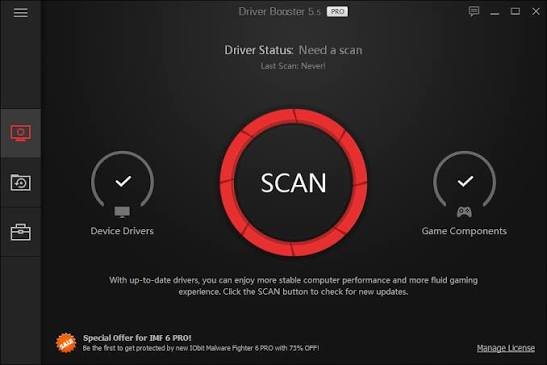
Driver Booster has emerged as one of the most trusted driver updating tools for Windows users. The latest version, Driver Booster 13, represents a significant leap forward in driver management technology. With an expanded database of over 18 million drivers, it can identify and update drivers for virtually any hardware component, from graphics cards and audio devices to network adapters and chipsets.
What sets Driver Booster apart is its commitment to security and reliability. Every driver update undergoes Microsoft WHQL certification and an IObit security scan, ensuring that only safe, verified drivers are installed on your system. This eliminates the risk of installing compromised files that could destabilize your system.
The software’s one-click update functionality makes driver maintenance effortless. Simply run a scan, review the detected driver issues, and click update. Driver Booster handles the rest, even creating system restore points and driver backups before applying updates so you can roll back if needed.
For gamers specifically, Driver Booster offers specialized features that directly impact gaming performance. The Game Boost mode fine-tunes your system for up to 5% better performance by closing unnecessary background processes and freeing system resources. The software also prioritizes game-ready driver updates for graphics cards like NVIDIA GeForce Game Ready and AMD Radeon Software Adrenalin editions.
Users have reported noticeable improvements after using Driver Booster. One gamer described how the tool updated his GPU driver and related DirectX files, completely eliminating game crashes. Another noted smoother gameplay and improved stability across multiple titles after optimizing Game Ready drivers.
The Pro version offers additional benefits including automatic background updates, faster download speeds, access to a wider driver database, and driver backup/restore functionality. For serious gamers who want to maintain peak performance without constant manual intervention, these features are invaluable.
To keep your system running at its best, consider using Driver Booster to update drivers automatically and ensure you never miss a critical update.
Understanding and Measuring FPS for Better Gaming
Frames per second (FPS) is the most direct measure of gaming performance. Higher FPS means smoother gameplay, reduced input lag, and a more competitive edge in fast-paced titles. Understanding your system’s FPS capabilities is essential for making informed decisions about hardware upgrades and graphics settings.
But how do you know what FPS your system can actually achieve? This is where an FPS calculator becomes an indispensable tool.
An FPS calculator estimates the frame rates your hardware can deliver across different games and settings. By entering your CPU, GPU, RAM, and other specifications, you can predict performance before even launching a game. This helps you avoid the disappointment of purchasing a game only to discover your system can’t run it smoothly.
IObit offers a free FPS calculator that provides fast, accurate performance predictions based on real benchmark data. The tool draws from sources like Tom’s Hardware, TechPowerUp, and NotebookCheck to deliver reliable estimates. You simply select your CPU and GPU, choose your game and graphics settings, and receive instant FPS predictions.
The results are categorized to help you understand exactly what to expect. Below 30 FPS is considered unplayable, 30–60 FPS is playable but not smooth, 60–144 FPS delivers smooth gaming, 144–240 FPS provides excellent high-refresh experiences, and 240+ FPS is elite competitive territory.
Beyond simple FPS prediction, the calculator offers deeper analysis including CPU and GPU utilization balance, FPS across different resolutions, and upgrade recommendations ranked by impact per dollar. This data helps you identify whether your CPU or GPU is the bottleneck holding back your performance.
For gamers considering upgrades, this information is invaluable. Rather than guessing which component to upgrade, you can make data-driven decisions that deliver the best performance improvement for your investment.
You can test your system’s capabilities using an FPS calculator to get personalized performance predictions and upgrade recommendations.
The Synergy: Drivers and FPS Working Together
Driver updates and FPS analysis are not isolated activities, they work together to create the optimal gaming experience.
Start by using the FPS calculator to establish a baseline of your system’s expected performance. If the results show lower FPS than you’d like, consider updating your drivers. Graphics driver updates frequently deliver measurable FPS gains, especially for newly released games. After updating, run the FPS calculator again to see the improvement. This provides concrete evidence of the value driver maintenance delivers.
The combination is particularly powerful when troubleshooting performance issues. If you’re experiencing lower FPS than expected, an FPS calculator can confirm whether your hardware is performing as it should. If performance is below predictions, outdated drivers are a likely culprit, and updating them with a tool like Driver Booster often resolves the issue.
Many gamers have discovered this synergy firsthand. After updating drivers with Driver Booster, they’ve reported noticeably smoother gameplay, improved stability, and better overall performance. When combined with the insights from an FPS calculator, you gain a complete picture of your system’s capabilities and how to optimize them.
Additional Optimization Tips for Maximum FPS
While drivers and FPS calculators form the foundation of performance optimization, several other techniques can help you squeeze every last frame from your system.
Enable Windows Game Mode: This feature prioritizes gaming processes and reduces background activity while playing. Many driver updaters, including Driver Booster, include Game Boost features that complement Windows Game Mode for even better results.
Adjust in-game graphics settings: Even with updated drivers, overly demanding settings can tank your FPS. Lowering shadow quality, anti-aliasing, motion blur, ambient occlusion, and volumetric lighting can provide noticeable FPS gains while maintaining excellent visual quality.
Reduce rendering resolution when necessary: Dropping from 4K to 1440p or from 1440p to 1080p can dramatically improve FPS, particularly for competitive gaming where smoothness takes priority over visual fidelity.
Remove bloatware and unnecessary programs: Background applications consume system resources that could be dedicated to gaming. Regularly cleaning your system of unnecessary programs can free up CPU and RAM for better gaming performance.
Keep all drivers updated, not just graphics: While graphics drivers get the most attention, chipset, audio, and network drivers also contribute to gaming stability and performance. A comprehensive driver updater ensures everything stays current.
Conclusion: Take Control of Your Gaming Performance
PC gaming in 2026 demands more attention to system optimization than ever before. The days of simply installing a game and expecting perfect performance are long gone. Modern titles require properly maintained drivers, optimized settings, and a clear understanding of your system’s capabilities.
Driver Booster addresses the driver maintenance challenge with an automated, secure, and user-friendly solution. Its massive driver database, one-click updates, and gaming-specific features like Game Boost make it an essential tool for any serious PC gamer.
The IObit FPS Calculator complements this by providing the data you need to understand your system’s performance and make informed decisions about upgrades and settings. Together, these tools give you complete control over your gaming experience.
Whether you’re a competitive esports player chasing every possible frame or a casual gamer who simply wants smooth, stable gameplay, taking the time to optimize your drivers and understand your FPS will pay dividends. Don’t let outdated drivers and unknown performance bottlenecks hold you back, update your drivers today and calculate your FPS to unlock your PC’s true gaming potential.